AnyTatt
See it on your arm before the needle.
Bring a design, or describe one. Place it on an arm built from your own measurements, and hand your artist a spec in centimetres.
Placement works without an account. AI generation needs Google sign-in.

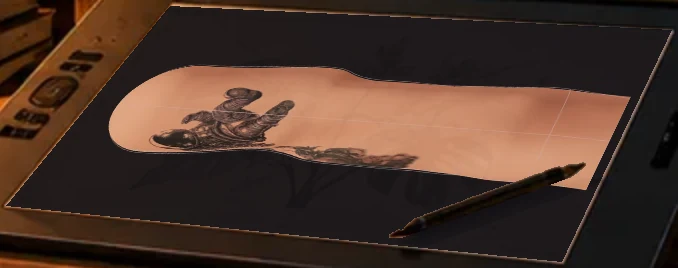
The studio in motion
From your arm to your next idea.
Set your measurements and skin tone, bring the pieces you already wear, then try a new design and save a view for your artist.
Placement
Every aspect, in centimetres
Turn the arm through front, outer, back and inner. This is a real arm from the studio, wearing three pieces; each one is a distance down, an angle around and a finished size.
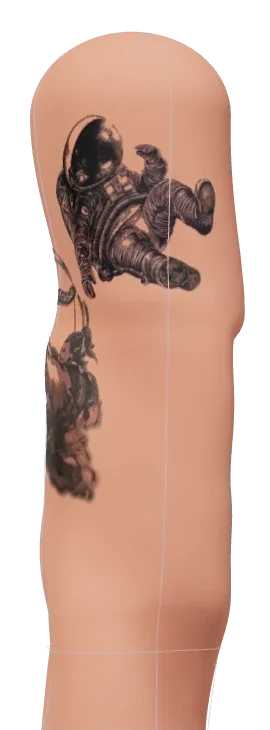
Drag the arm, or use the slider and arrow keys.
- howdy8.0 cm down · 339° · 9.0 × 8.7 cm
- Houyi14.6 cm down · 244° · 10.4 × 12.5 cm
- Gengar22.6 cm down · 181° · 5.7 × 9.4 cm
How it works
Measured, not mannequin
Seven tape measurements build the arm.
- Shoulder
- Bicep
- Elbow
- Forearm
- Wrist
- Upper arm length
- Forearm length
An arm from seven measurements
A tape measure, not a body scan. Five circumferences and two lengths drive a parametric surface, and girth stays exact at every height, so a 9 cm piece on screen is a 9 cm piece on skin.
Your own photo of the design
A photo of a tattoo, a scanned stencil or a flash sheet. Ink is lifted from the image and white becomes bare skin; a lasso fixes whatever the automatic pass gets wrong.
Placement in centimetres
Every piece reads as a distance down from the shoulder tip, an angle around the arm and a finished size, measured along the curve so it does not quietly grow at the elbow and wrist.
Something to hand the artist
PNG and text exports, plus project files you can save and reopen. Work autosaves in the browser.
Designs
Start with what you have. Or what you imagine.
The studio gives you two ways to begin, then lets you adjust the result on your arm.
Upload yours
Bring a tattoo photo, stencil, or design image. It stays on your device unless you choose to sync.
Create with AI
Describe a new piece and choose a style. Sign in with Google for five free designs a day.
Place and turn
Move and size a piece on the measured arm, then check the front, outer, back, and inner views.
Private by default
Nothing leaves your device until you say so
Photos, measurements and placements stay in your browser. Sync is a switch you turn on, not a default, and only the words of a prompt are sent to make a design.
Stack
Under the hood
- Client
- Three.js with a hand-rolled orbit camera and decal pipeline. Image processing runs on a canvas in the browser
- Photos stay put
- Ink extraction happens on your machine. Photos, measurements and placements stay in the browser unless you turn on sync
- Accounts
- Optional Google sign-in for AI designs and cross-device sync, with projects in Firestore and designs in Cloud Storage. Guests can use everything else
- Image generation
- Vertex AI behind the service: sign-in required, five designs a day on a free account, with reservations so concurrent requests cannot overspend
- Hosting
- A container service on Google Cloud serving both the app and the API, fronted by Firebase Hosting on a custom domain. It scales to zero between visits
- Delivery
- Terraform in two layers, deployed from GitHub Actions through workload identity federation. No service-account keys
Status
Where it stands
Public and open to anyone since October 2026, with Google sign-in needed only for AI designs. It is a placement rehearsal, not a body scan: confirm dimensions and the final stencil with your artist. The hardening still open:
- Fit and dimensions validated against calibrated fixtures and real arms across body sizes
- A measured, rigged anatomy and more realistic skin and ink
- Abuse and spend controls for generation across many accounts
- Image processing off the main thread, and long sessions profiled on phones
- The full flow tested with tattoo artists, and the deploy and rollback path exercised
Try it
Rehearse your next piece
Placement works without an account. AI generation needs Google sign-in.